TAGTHAi Easy Pay
Experience the tourist e-Wallet featuring
TAGTHAi Easy Pay for seamless payments
nationwide.
TAGTHAi Easy Pay
Experience the tourist e-Wallet featuring
TAGTHAi Easy Pay for seamless payments nationwide.

Easily purchase any local food and goods.
No Cash needed.
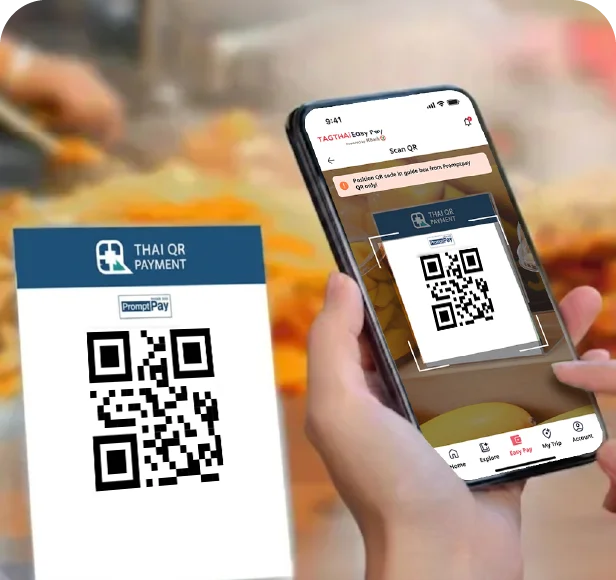
Go cashless, pay with ease, using
'PromptPay QR'
Experience hassle-free payments in
Thailand by simply scanning and
paying with 'PromptPay QR'
on your TAGTHAi app.
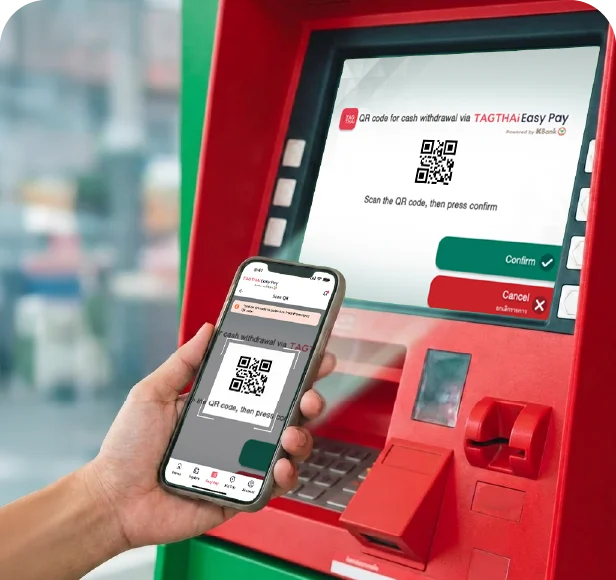
Free of Charge
Apply for e-Wallet in just a few
steps. With no application or
card fees. Withdraw cash at
any KASIKORNBANK ATMs
nationwide with no fees.
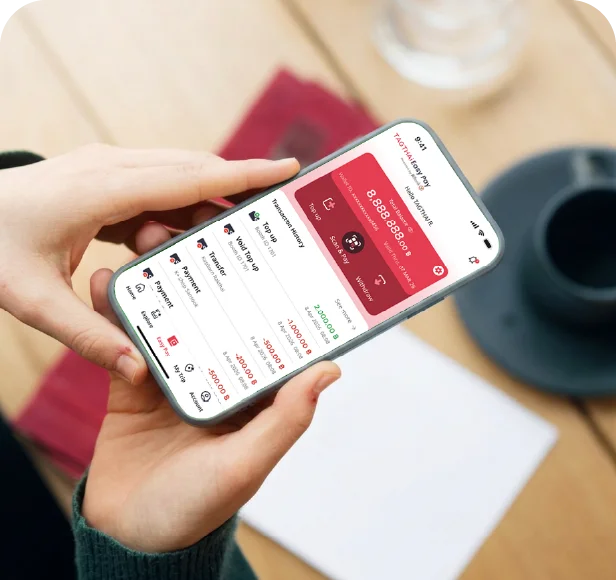
Transaction History
Keep track of all your spending
effortlessly with the Transaction History
feature on your TAGTHAi app.
Go cashless, pay with ease, using
'PromptPay QR'
Experience hassle-free payments in
Thailand by simply scanning and
paying with 'PromptPay QR'
on your TAGTHAi app.
Free of Charge
Apply for e-Wallet in just a few
steps. With no application or
card fees. Withdraw cash at
any KASIKORNBANK ATMs
nationwide with no fees.
Transaction History
Keep track of all your spending
effortlessly with the Transaction History
feature on your TAGTHAi app.
How to Use
How to Pre-register
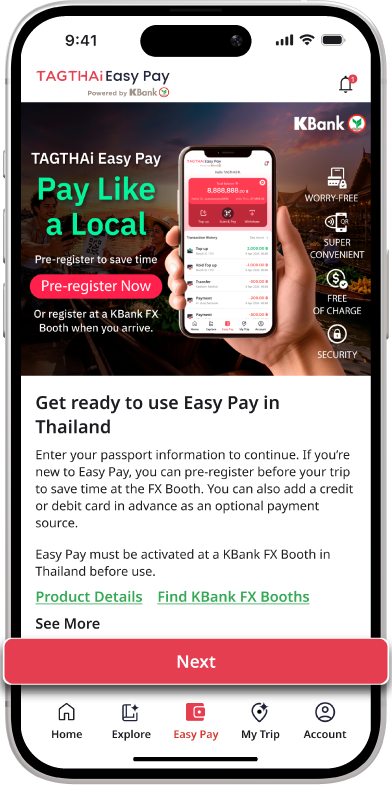
Step 1/5
Go to Easy Pay and tap Next.
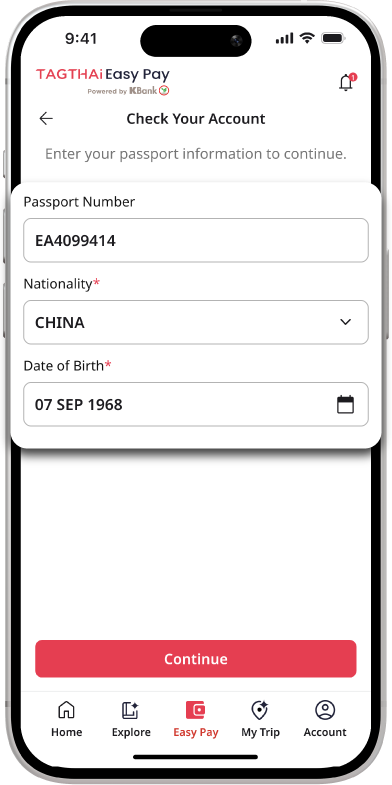
Step 2/5
Enter your passport information
to check your TAGTHAi Easy Pay
account.
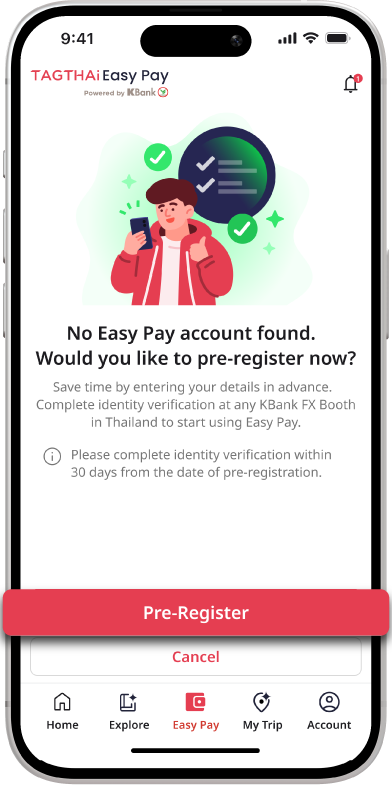
Step 3/5
If you do not have an Easy Pay
account, tap Pre-Register to
register in advance.
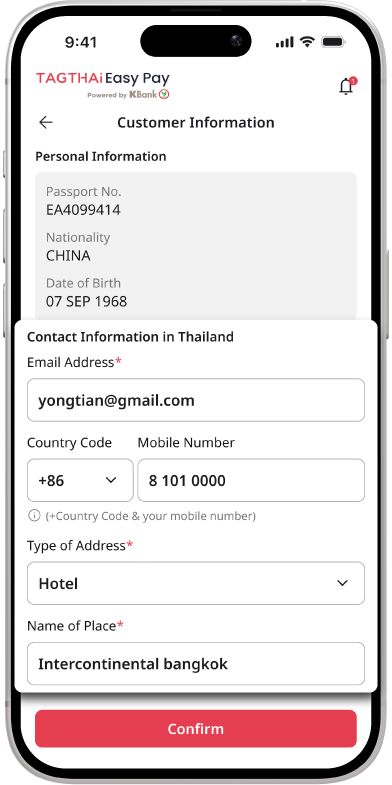
Step 4/5
Enter your personal information
and tap Confirm.
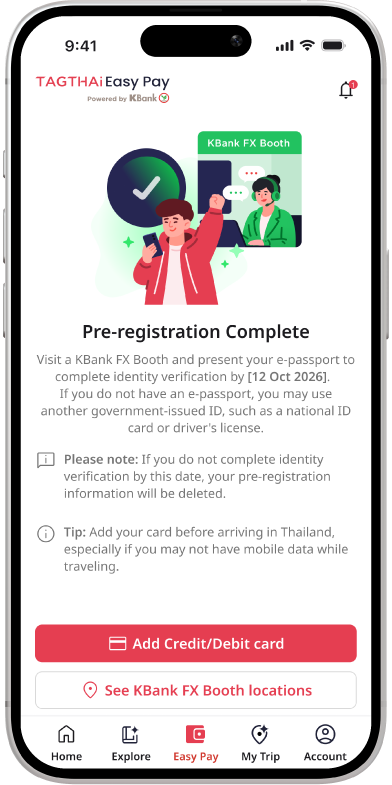
Step 5/5
Once pre-registration iscomplete, tap Add Credit/Debit
Card to add a card for paymentsin Thailand.

Add your card before arriving in Thailand, especially if you may not have mobile data while traveling.
Link Your e-Wallet
Link a Credit/Debit Card
Scan & Pay
Transaction History
Cash Withdrawal at KASIKORNBANK ATM
Step 1/5
Go to Easy Pay and tap Next.
Step 2/5
Enter your passport information
to check your TAGTHAi Easy Pay
account.
Step 3/5
If you do not have an Easy Pay
account, tap Pre-Register to
register in advance.
Step 4/5
Enter your personal information
and tap Confirm.
Step 5/5
Once pre-registration iscomplete, tap Add Credit/Debit
Card to add a card for paymentsin Thailand.
Add your card before arriving in Thailand, especially if you may not have mobile data while traveling.
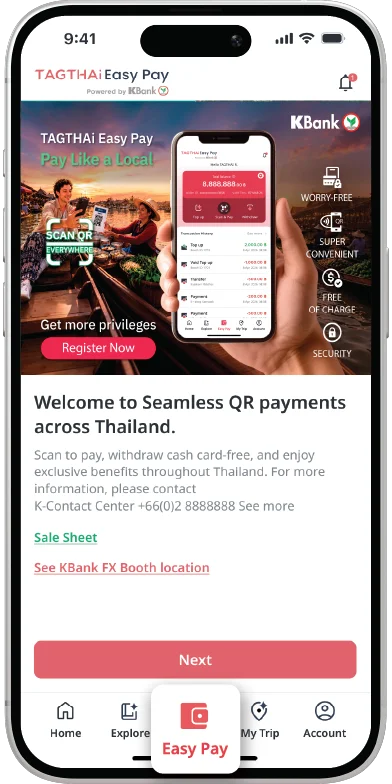
Step 1/6
Open the TAGTHAi app and select Easy Pay to link your e-Wallet.
Step 2/6
Enter your passport information to
check your TAGTHAi Easy Pay
account.
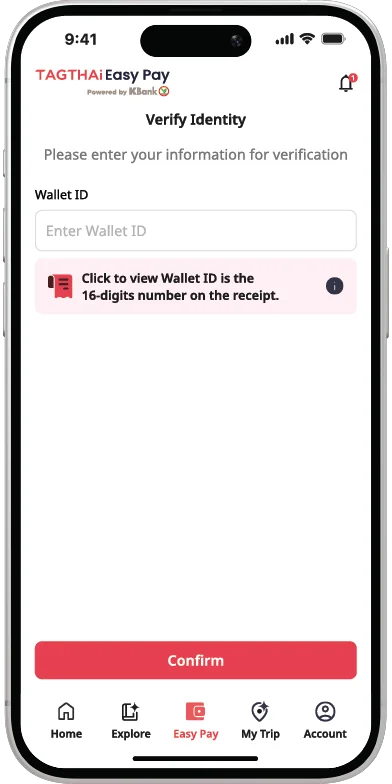
Step 3/6
Enter your Passport Number and Wallet Number, then tap Continue.
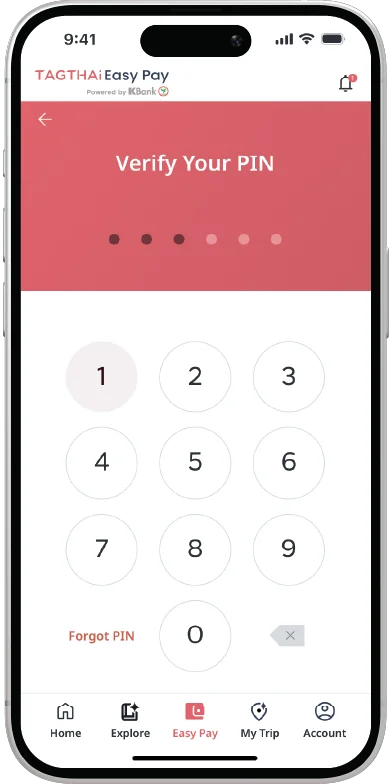
Step 4/6
Enter the 6-digit PIN received
when exchanging currency at a KASIKORNBANK Foreign
Exchange (FX) Booth.
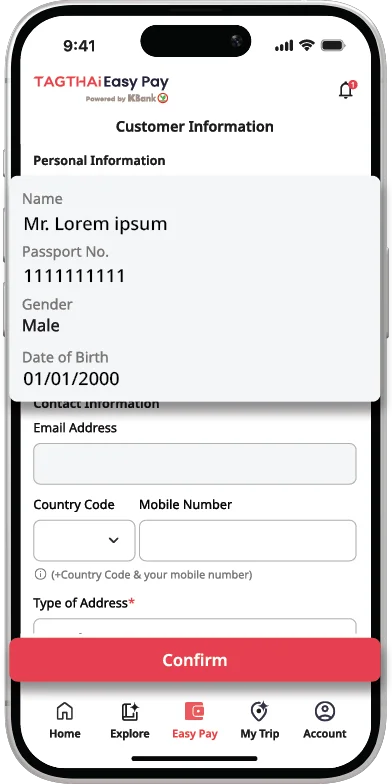
Step 5/6
Review the information and
confirm.
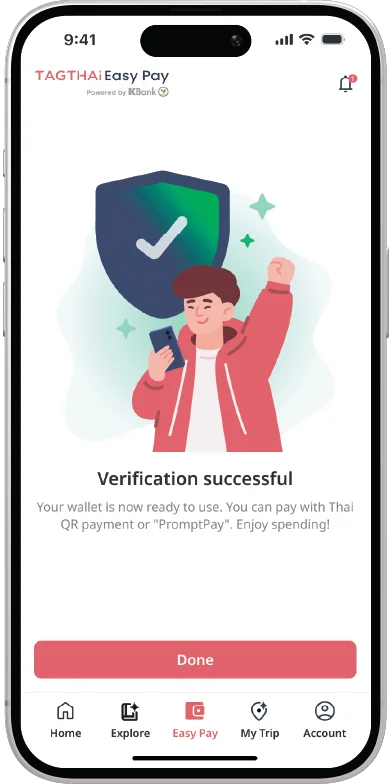
Step 6/6
Your e-Wallet is now linked. You
can start making payments.
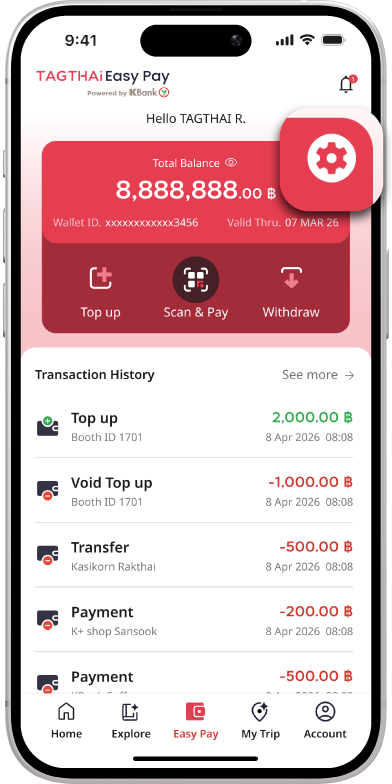
Step 1/6
On the Easy Pay page, select the Settings icon (gear icon).
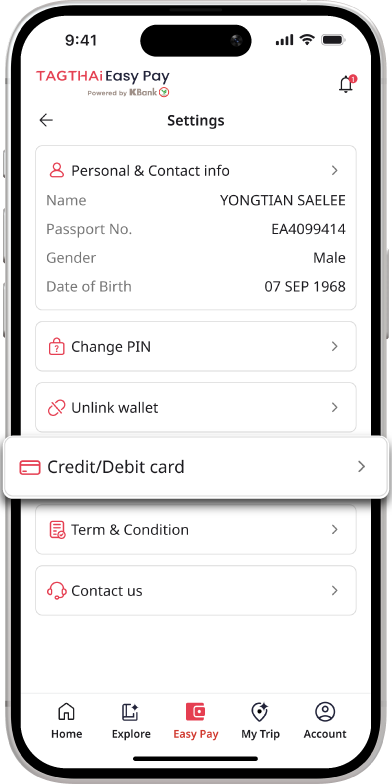
Step 2/6
Select Credit/Debit Card.
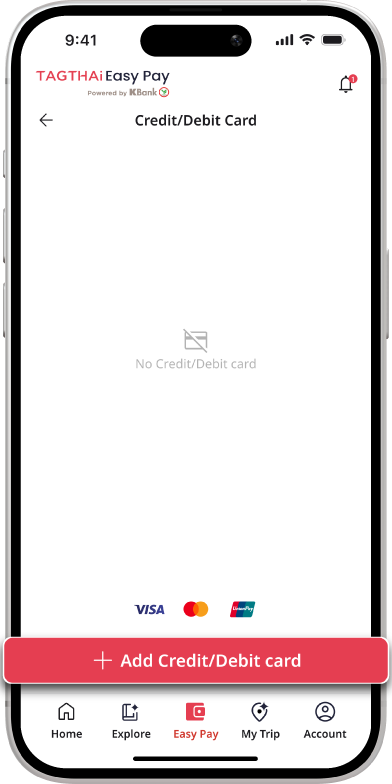
Step 3/6
Select Add Credit/Debit Card.
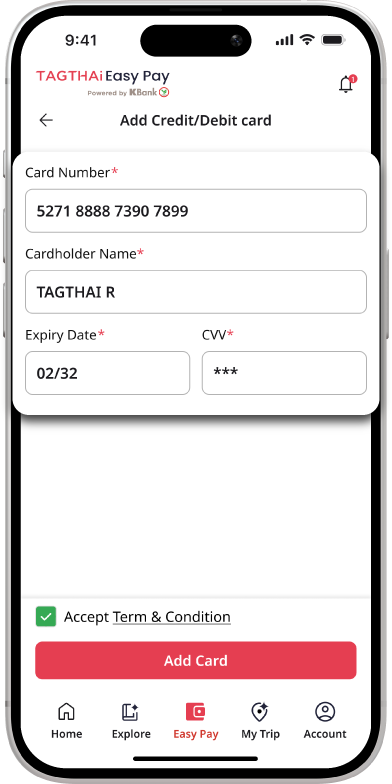
Step 4/6
Enter your credit/debit card details and proceed.
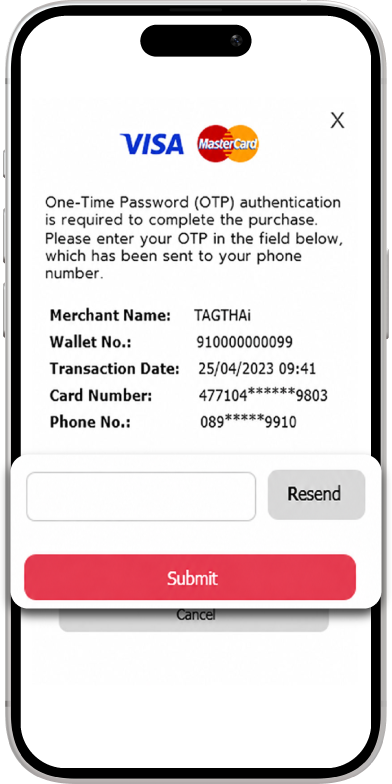
Step 5/6
Complete the authentication process required by your card issuer, such as entering an OTP
(if applicable).
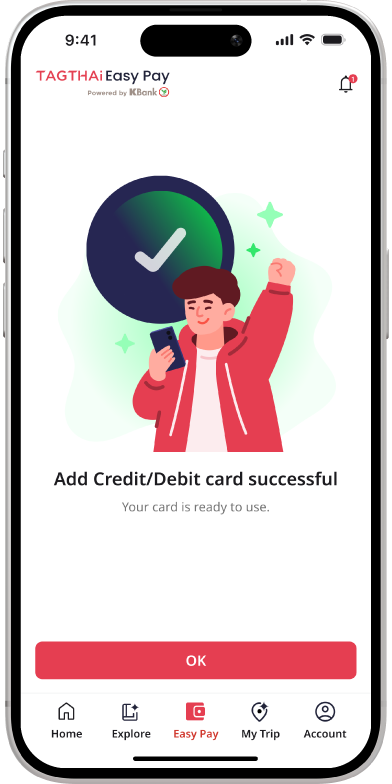
Step 6/6
Your credit/debit card has been successfully linked.
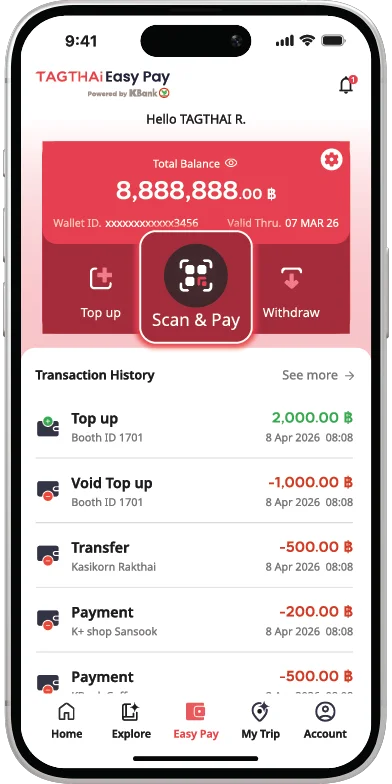
Step 1/6
Open the TAGTHAi app and
select Scan & Pay.
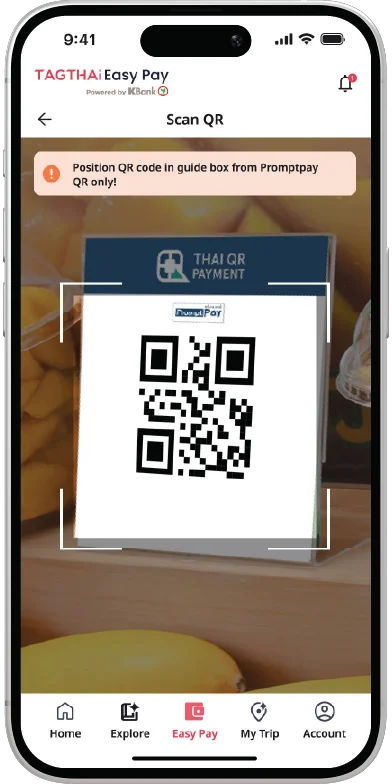
Step 2/6
Scan the QR code to make a payment.
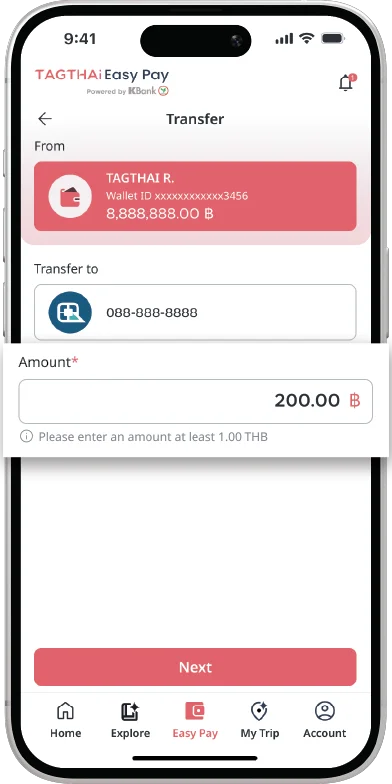
Step 3/6
Enter the payment amount,
which must not exceed the
card’s available balance.
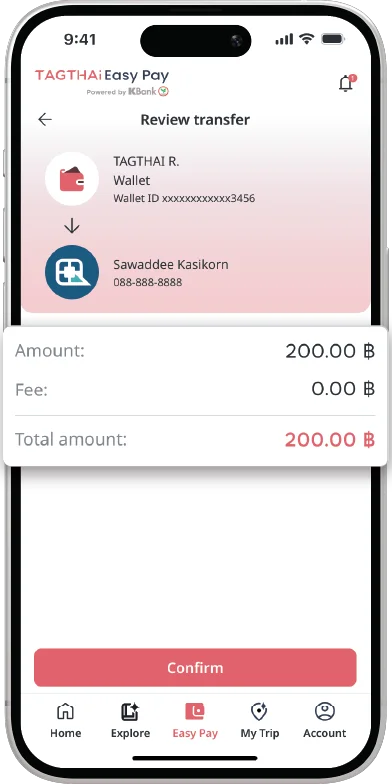
Step 4/6
If the payment amount is
already provided, it will be
displayed automatically. The amount must not exceed the
card’s available balance.
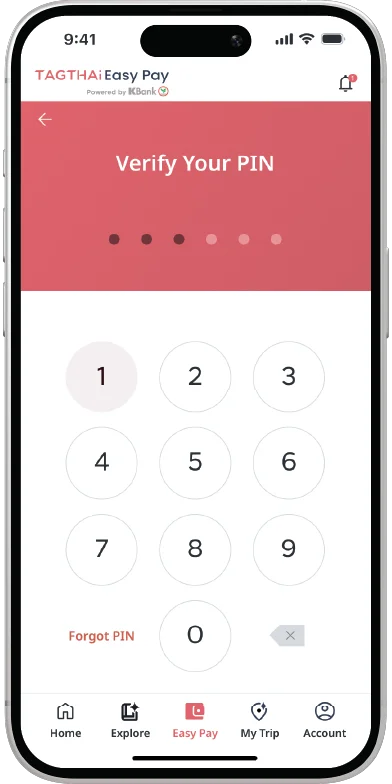
Step 5/6
Enter your PIN to process your transaction.
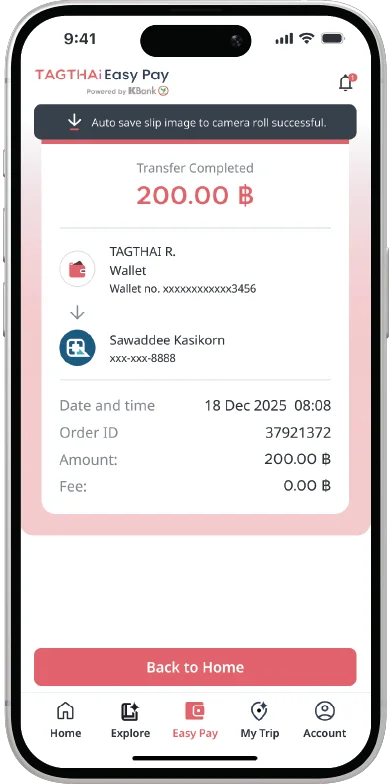
Step 6/6
The transaction is successful.
You can view your transaction history in the TAGTHAi app.
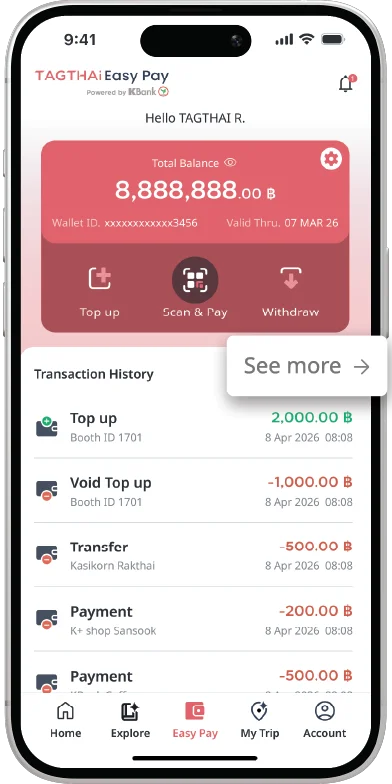
Step 1/3
Select the “See More”
button to check transactions.
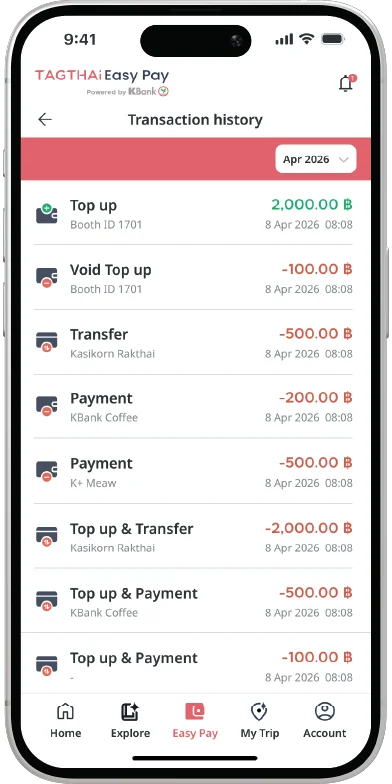
Step 2/3
Show transaction history.
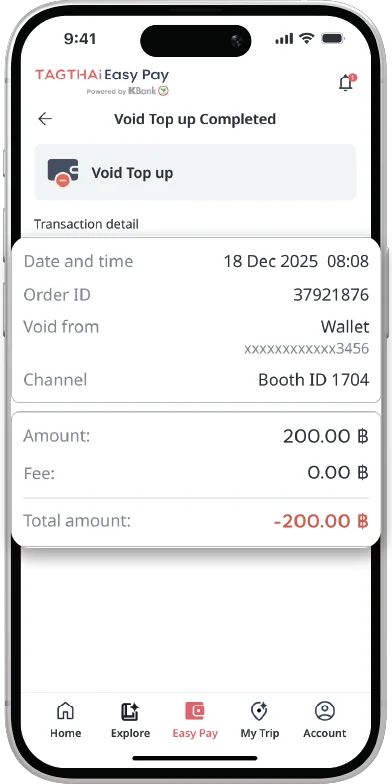
Step 3/3
Click to view details of each transaction.
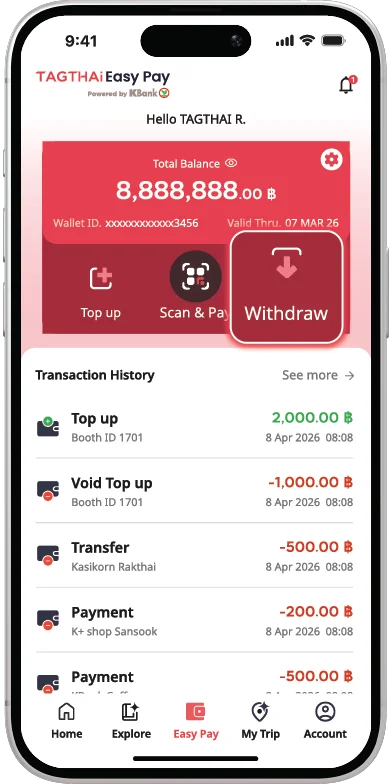
Step 1/8
Open the TAGTHAi app and select “Easy Pay” and “Withdraw”.
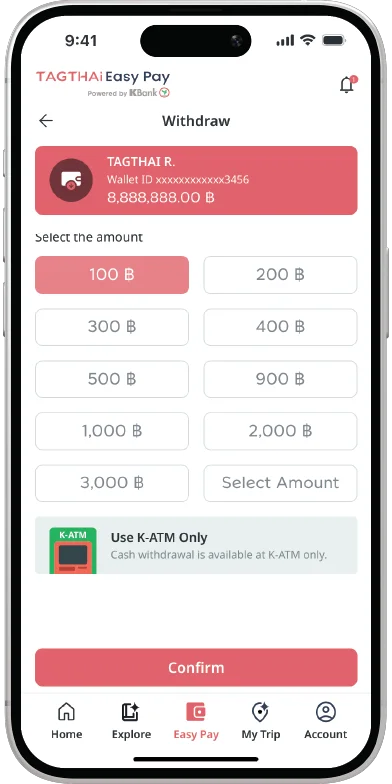
Step 2/8
Enter the withdrawal amount and tap “Confirm”.
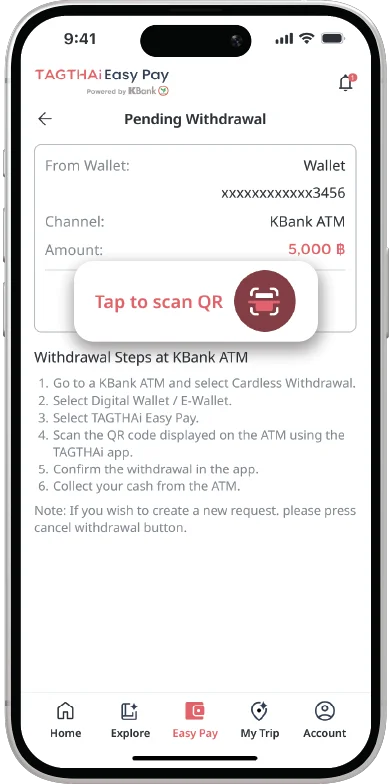
Step 3/8
Review the transaction details
and proceed to a
KASIKORNBANK ATM.
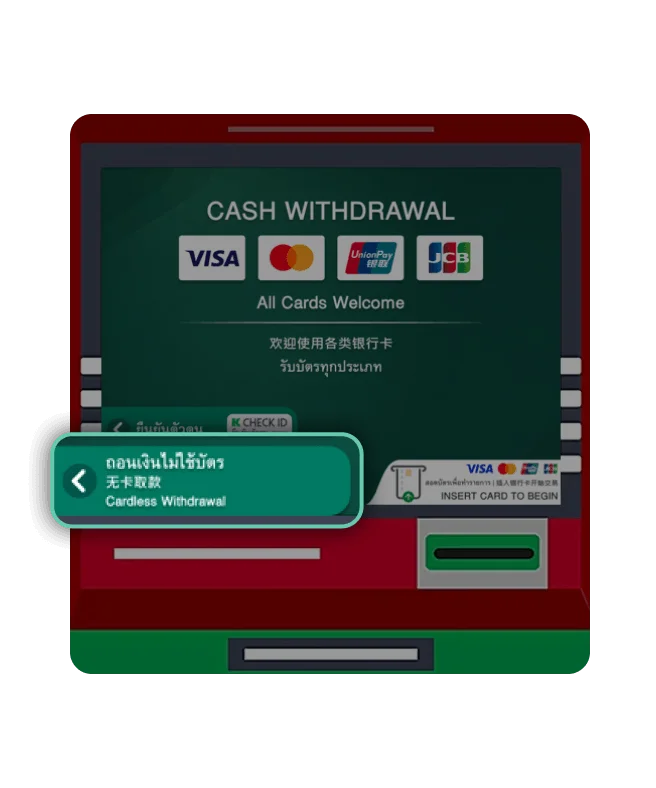
Step 4/8
At a KASIKORNBANK ATM, select
“Cardless Withdrawal”
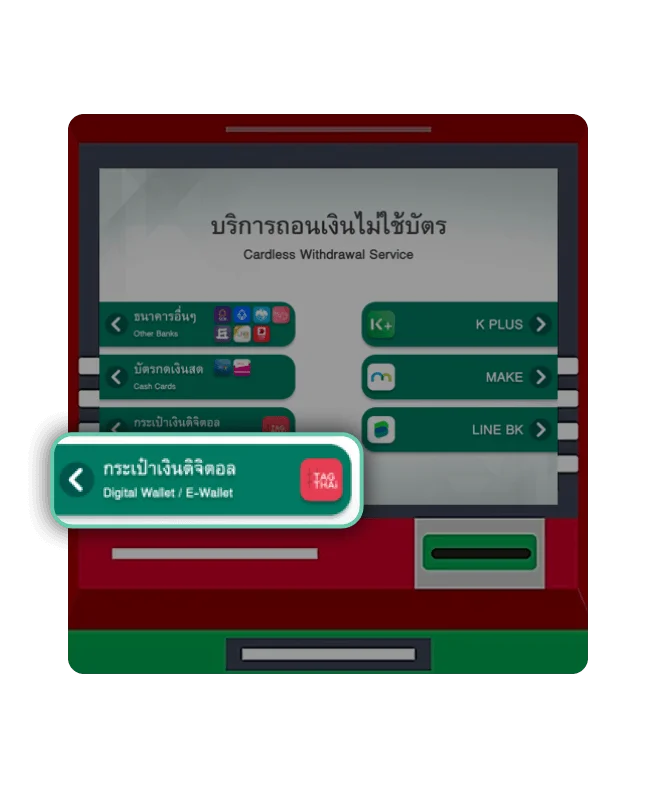
Step 5/8
Select “Digital Wallet / e-Wallet”.
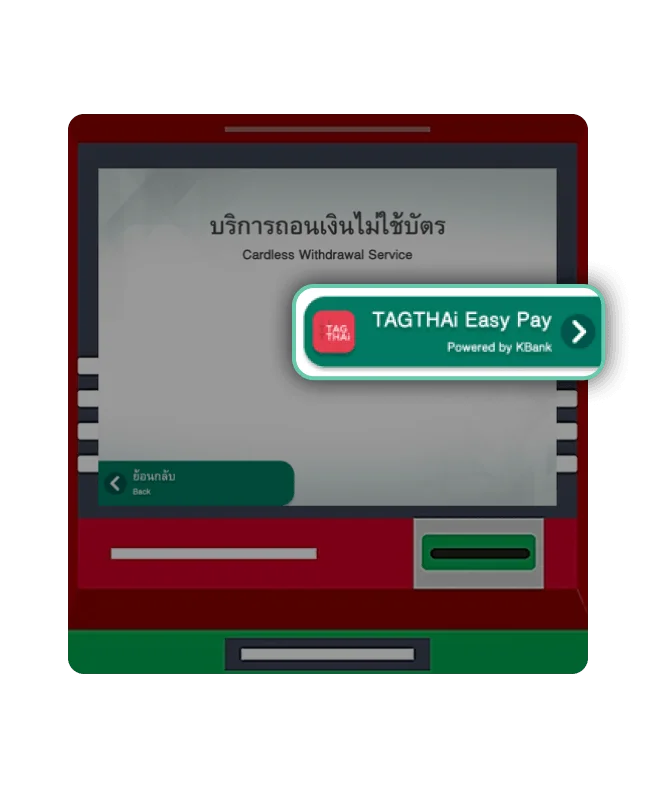
Step 6/8
Select “TAGTHAi Easy Pay”.
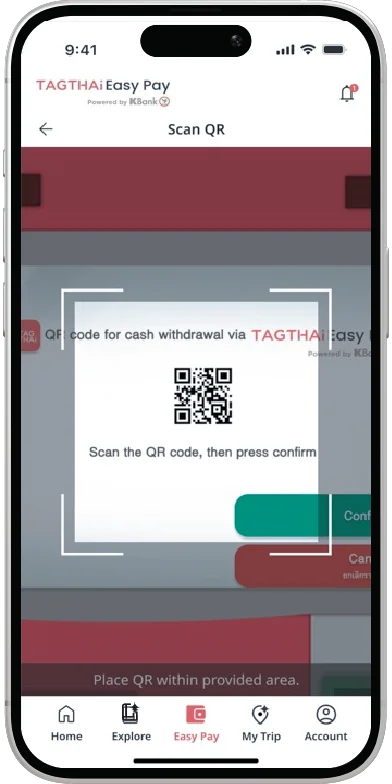
Step 7/8
Scan QR displayed on a KASIKORNBANK ATM to confirm the withdrawal transaction.
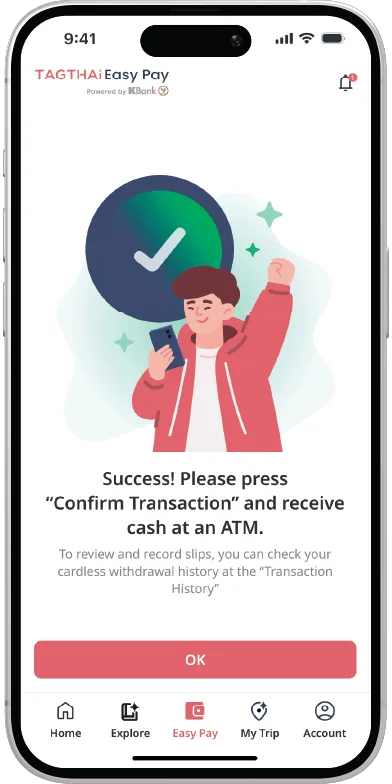
Step 8/8
Once the transaction is successful, a
KASIKORNBANK ATM will dispense your cash. You can view the withdrawal transaction details in the TAGTHAi app.
How to Get
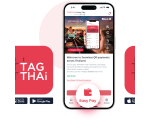
Download & Pre-Register
TAGTHAi Easy Pay
Save time on your trip! Pre-register within30 days before activating youre-Wallet at a KASIKORNBANK ForeignExchange Booth.
Save time on your trip! Pre-register
within 30 days before activating your
e-Wallet at a KASIKORNBANK Foreign
Exchange Booth.
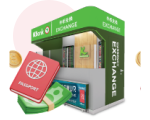
Find Foreign Exchange Booth
Visit a KASIKORNBANK Foreign ExchangeBooth with your passport and foreigncurrency to apply, verify your identity inperson, and activate your e-wallet.
Visit a KASIKORNBANK Foreign Exchange
Booth with your passport and foreign
currency to apply, verify your identity in
person, and activate your e-wallet.
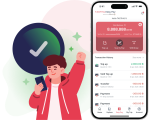
Link Your e-Wallet in the
TAGTHAi App
Enter your passport information and16-digit Wallet ID to link your e-Wallet.Your e-Wallet is now linked!Note: You can find your Wallet ID on yourKASIKORNBANK FX Booth receipt.
Enter your passport information and
16-digit Wallet ID to link your e-Wallet.
Your e-Wallet is now linked!
Note: You can find your Wallet ID on your
KASIKORNBANK FX Booth receipt.
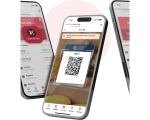
Scan & Pay Like A Local
Spend with PromptPay QR like a Thai.With TAGTHAi Easy Pay, you can scanand pay using the everyday cashlessmethod trusted by locals for food, shops,and services all over Thailand.
Spend with PromptPay QR like a Thai.
With TAGTHAi Easy Pay, you can scan
and pay using the everyday cashless
method trusted by locals for food, shops,
and services all over Thailand.
Download & Pre-Register
TAGTHAi Easy Pay
Save time on your trip! Pre-register within30 days before activating youre-Wallet at a KASIKORNBANK ForeignExchange Booth.
Save time on your trip! Pre-register
within 30 days before activating your
e-Wallet at a KASIKORNBANK Foreign
Exchange Booth.
Find Foreign Exchange Booth
Visit a KASIKORNBANK Foreign ExchangeBooth with your passport and foreigncurrency to apply, verify your identity inperson, and activate your e-wallet.
Visit a KASIKORNBANK Foreign Exchange
Booth with your passport and foreign
currency to apply, verify your identity in
person, and activate your e-wallet.
Link Your e-Wallet in the
TAGTHAi App
Enter your passport information and16-digit Wallet ID to link your e-Wallet.Your e-Wallet is now linked!Note: You can find your Wallet ID on yourKASIKORNBANK FX Booth receipt.
Enter your passport information and
16-digit Wallet ID to link your e-Wallet.
Your e-Wallet is now linked!
Note: You can find your Wallet ID on your
KASIKORNBANK FX Booth receipt.
Scan & Pay Like A Local
Spend with PromptPay QR like a Thai.With TAGTHAi Easy Pay, you can scanand pay using the everyday cashlessmethod trusted by locals for food, shops,and services all over Thailand.
Spend with PromptPay QR like a Thai.
With TAGTHAi Easy Pay, you can scan
and pay using the everyday cashless
method trusted by locals for food, shops,
and services all over Thailand.
More Convenience, More Privileges
with TAGTHAi Easy Pay
Sign up & unlock more exclusive benefits now!

FAQ
Application and fee
Who can apply for TAGTHAi Easy Pay?
How can I apply for TAGTHAi Easy Pay and use it through the TAGTHAi application?
Are there any fees for using the service?
Usage
Where can TAGTHAi Easy Pay be used?
Management
How to top-up and get refunds?
Can I top up my e-Wallet using Thai Baht?
Where can I check my transaction history and balance?
Contact information
Who should I contact if I have additional questions?